On this page
Quick answer
Which form builder is best for quote requests?
Jotform is our broadest-fit choice for small service businesses that need detailed quote requests, conditional questions, file uploads and a practical workflow. Fillout is the strongest value starting point if you want substantial logic, calculations, uploads, payments and workflow features on a generous free plan. Cognito Forms is the better specialist when the quote depends on formulas, quantities, repeating line items, deposits or more complex workflow logic.
Typeform is a different kind of recommendation: choose it when the first job is qualifying the prospect through a guided conversation, not when you need a dense estimator. Paperform is attractive for polished pricing/checkout-style experiences, Tally is excellent for lean low-cost forms, and Gravity Forms makes sense when WordPress ownership and on-site control are more important than using a hosted form platform.
Detailed service requests, uploads, practical conditional workflows.
Strong logic, calculations, files, payments and integrations with 1,000 free responses per month.
Advanced calculations, repeating sections, deposits and workflow logic.
Guided branching when the sales conversation should start before the quote.
Polished form pages, custom pricing rules and pay-now/pay-later flows.
Conditional logic and calculations with a very generous free model.
Native WordPress forms with core calculations, logic and file uploads.
Search intent
First: a quote request form is not the same as quoting software
This distinction matters because many search results mix two different jobs. A quote request form is the front door: it collects the information a business needs to understand the job, qualify the prospect, decide whether an estimate is possible, and choose the next action. Quoting software sits later in the process: it helps create, send, approve or track the actual estimate, proposal or quote.
Some form builders can calculate an instant estimate when pricing rules are deterministic. That can work for services priced by quantity, size, package, distance or add-ons. But if the final price depends on an inspection, technical review, inventory check or site visit, the form should collect enough information to prepare the quote—not pretend to produce a binding number.
Example: roofing contractor
The request form can ask for property location, roof type, approximate size, issue type, timing and photos. It can route an urgent leak differently from a planned replacement. The actual proposal may still be created later in dedicated quoting or field-service software after review.
Methodology
How we evaluated quote-request form builders
- Conditional logicCan the form hide irrelevant questions and branch by service, job type, location, answer or qualification status?
- File uploadsCan prospects attach photos, plans or reference documents when those materially improve quote accuracy?
- CalculationsCan the form calculate scores, quantities or estimates when the business has deterministic pricing rules?
- PaymentsCan a qualified visitor pay a deposit or fee when that is genuinely part of the workflow?
- Routing and follow-upCan submissions trigger notifications, different endings, CRM/database handoff or another next step?
- Mobile experienceCan a customer complete the request and upload evidence from a phone without unnecessary complexity?
- Limits and maintenanceWe checked response limits, free-plan constraints and workflow complexity because these can matter more than template count.
- Evidence basisPrimary vendor documentation and current pricing/features were checked on October 21, 2026. This article does not claim long-term hands-on testing of all seven products.
Comparison
7 quote-request form builders compared
| Tool | Best fit | Quote-workflow strengths | Main caution |
|---|---|---|---|
| Jotform | Detailed service quote requests | Conditional logic, uploads, calculations, payments, notifications, large template ecosystem | Account limits and feature depth can make plan selection less simple |
| Fillout | Strong free workflow | Conditional logic, calculations/scoring, uploads, payments, scheduling, workflows | Teams should verify which advanced controls require paid plans |
| Cognito Forms | Complex estimators | Powerful calculations, repeating sections, conditional rules, payments/deposits | More capability can mean a steeper build/maintenance learning curve |
| Typeform | Guided lead qualification | Branching, polished one-question flow, files, payments, integrations | Response limits and conversational format are less ideal for dense estimators |
| Paperform | Polished price/checkout flow | Custom pricing rules, calculations, products/payments, pay-now/pay-later options | Low free submission allowance; paid pricing is higher than lean form tools |
| Tally | Simple low-cost quote requests | Free conditional logic, calculations, file uploads, payments, generous usage model | Complex operational workflows may justify a more structured platform |
| Gravity Forms | WordPress-native ownership | Conditional logic, file uploads and calculations in WordPress | No free version; you maintain the WordPress environment and integrations |
Jotform: best broad fit for detailed service quote requests
Best for: contractors, agencies and service businesses that need conditional questions, photo/document uploads and a practical request workflow without building the form system from scratch.
Jotform is our broadest-fit pick because it covers the mundane details that quote requests often need. Its current quote-request templates explicitly support conditional logic, file uploads and automatic notifications, while its form builder supports calculations and payment workflows. That makes it useful when a request needs more than a polished contact form.
A landscaper, for example, can ask what service the prospect wants, then show lawn-size questions only for lawn work and photo uploads only when they help assess the job. An agency can branch by service, budget and launch date. A contractor can collect reference images and alert the correct estimator. Those are ordinary operational needs—and Jotform is designed around that kind of form complexity.
Where it wins: breadth. You can start with a template and add branching, calculations, uploads, payment fields, notifications and integrations without changing platforms. Jotform also has a free Starter plan; its official guidance says the free account receives up to 100 entries per month, so serious lead generation should model expected volume before relying on the free tier.
Main limitation: the product has many capabilities and limits. Monthly submissions, storage, views, payment submissions and other account limits can all affect the real plan fit. For a simple five-field quote request, a lighter tool may be easier.
Good workflow example
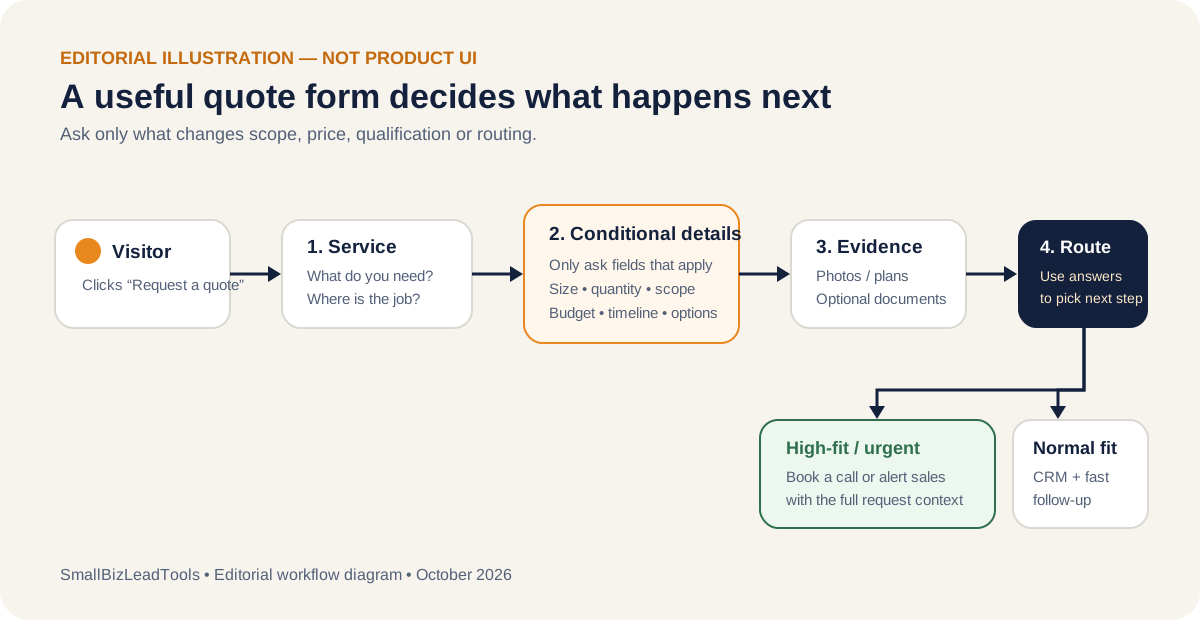
Service selected → conditional scope questions → photos/files when relevant → preferred timing → contact details → estimator notification → CRM or callback.
Fillout: best free starting point for a serious quote-request workflow
Best for: small teams that want strong branching, calculations, files, payments and workflow features before paying for a higher-volume plan.
Fillout stands out because its current free plan is unusually capable for a real business workflow. The provider lists unlimited forms and seats, 1,000 responses per month, multi-page forms, embedded forms, payments, conditional logic, unlimited file uploads, workflows, calculations/scoring, scheduling and PDF generation on the free tier.
That combination is directly relevant to quote requests. A service business can branch by service type, calculate a lead score or indicative amount, collect photos, and send the respondent down a different path depending on what they entered. Fillout's page logic documentation also supports branching between pages and different ending paths.
Where it wins: the amount of workflow capability available before cost becomes the deciding factor. That makes it particularly interesting for a new site that wants to validate its quote-request process before committing to another monthly SaaS bill.
Main limitation: do not choose it solely because the free tier is generous. If your business eventually needs very specialized approval, document or CRM logic, verify the exact integration and workflow behavior before migrating a mission-critical form.
Good workflow example
Choose service → branch to project-specific page → upload photos → calculate internal qualification score → if high-fit, show booking step; otherwise submit to normal follow-up.
Cognito Forms: best for complex quote calculations, line items and deposits
Best for: businesses whose estimate logic depends on quantities, formulas, repeating items, conditional totals or deposit rules.
Cognito Forms deserves a separate category because its calculation and conditional-logic system goes deeper than a typical lead form. Its documentation supports numeric calculations, repeating sections, conditional field/page visibility, email routing, conditional payments and workflow actions. That is useful when a quote request starts to resemble a structured estimator.
Imagine a cleaning company quoting multiple rooms, an event company collecting repeating equipment quantities, or a service that prices by hours, units and add-ons. Cognito can use calculation fields and repeating data rather than forcing the visitor into a rigid set of single-value questions. Its current documentation also shows conditional deposit calculations and saving a card on file for a later balance.
Where it wins: rules and calculations. If the quote needs formulas rather than just qualification questions, Cognito is one of the strongest options in this shortlist.
Main limitation: capability creates maintenance responsibility. A complex formula-heavy estimator needs testing whenever prices or service rules change. If you only need project details and photos, Jotform, Fillout or Tally can be simpler.
Current plan note: Cognito's pricing page lists a free Individual plan with 100 entries per month and paid tiers with higher entry limits and workflow features. Confirm current annual/monthly pricing before committing.
Typeform: best when qualification should feel like a guided conversation
Best for: consultants, agencies and premium services that need to qualify a prospect before deciding whether to invite them to a call or quote process.
Typeform is not our first choice for a dense construction estimator or a form with many visible line items. Its strength is the sequence. Branching logic lets you send respondents down different paths, and the one-question-at-a-time experience can make a discovery or consultation request feel less like paperwork.
That is valuable when the early questions matter more than calculating a price: service needed, company size, problem, budget range, urgency, fit criteria and desired outcome. A qualified prospect can reach a booking or sales ending; another prospect can receive a different next step.
Typeform does support file uploads and payment questions on paid plans. But its official documentation also makes response capacity a key buying consideration: limits apply across all forms in the account, and the Basic plan documentation currently states 100 responses per month. Its File Upload question currently accepts files up to 10 MB per upload.
Where it wins: guided pre-quote qualification and brand presentation.
Main limitation: response limits and the conversational layout make it less natural for a quote workflow that needs many dimensions, line items or attachments in one place.
Good workflow example
What service? → what outcome? → budget/timeline → branch by fit → collect contact details → qualified leads see a booking path; other leads enter follow-up.
Paperform: best for polished pricing rules and pay-now/pay-later experiences
Best for: businesses that want a quote or estimate form to feel more like a branded page, with pricing rules and an optional payment step.
Paperform is interesting for quote requests because pricing is a first-class part of the form experience. Its documentation supports custom pricing rules based on answers, calculations, product/price fields and workflows where the customer can pay now or pay later. That can work well for services with configurable packages or add-ons.
If you sell a standardized service—say photography packages, event services, cleaning packages or design add-ons—you can use answers to change the total or estimate. If a deposit is appropriate, the form can lead into payment; if not, the same workflow can keep the amount as quote context rather than immediate checkout.
Where it wins: presentation plus pricing logic. It is especially attractive when the form itself needs to look like a polished mini landing page rather than a utilitarian back-office form.
Main limitation: cost and usage. Paperform's current pricing page lists a permanent free plan with 30 submissions per month, while Pro is listed at $49 per month when billed annually. A business primarily collecting basic quote requests may get better economics elsewhere.
Tally: best low-cost option for simple quote requests with real logic
Best for: freelancers and smaller service businesses that want conditional logic, calculations and uploads without a heavy platform or low submission ceiling.
Tally's editor works more like a document than a conventional form builder, which keeps simple forms quick to create. More importantly for this use case, its current documentation includes conditional logic, calculated fields, file uploads and Stripe payments. Tally says 99% of its features are available free and its free usage is not capped by a fixed number of forms, submissions or questions, subject to its fair-use rules.
That makes Tally a strong fit for a straightforward quote request: service selection, a handful of conditional details, an optional photo/file, and a calculated qualification flag or indicative estimate. Tally's calculated fields documentation specifically describes pricing calculators and lead scoring as use cases.
Where it wins: simplicity and economics. The current Pro plan is $29 per month and primarily adds business presentation/team features such as branding removal and custom domains rather than unlocking basic conditional logic.
Main limitation: for a complex multi-team operational process, you may prefer a platform with more structured workflow, approval and database capabilities. Also review file-size and fair-use policies if uploads are central to the business.
Gravity Forms: best for WordPress businesses that want the quote form on their own stack
Best for: WordPress sites that want native form ownership, calculations, conditional logic and file uploads without embedding another hosted form platform.
Gravity Forms is different from the hosted tools above: it is a premium WordPress plugin. Its core features include conditional logic, multi-page forms and file uploads, and its calculation functionality can build quote forms and price calculators from submitted values. That makes it a good fit when the website team is already comfortable maintaining WordPress.
The advantage is control. The form can live directly in the site's WordPress environment, integrate with the rest of the WordPress stack and use add-ons as the workflow grows. For a business already paying for and maintaining WordPress, that may be more coherent than adding another standalone form service.
Where it wins: WordPress-native control and extensibility.
Main limitation: there is no free version. Gravity Forms currently lists its Basic license at $59 per year, and you are responsible for the WordPress environment, plugin updates, compatibility and the integrations around the form. For a non-WordPress static site, use a hosted form builder instead.
Original framework
What fields should a quote request form include?
The best quote form is usually not the longest one. Start with a compact core and reveal project-specific fields only when they change the scope, price, qualification or routing decision.
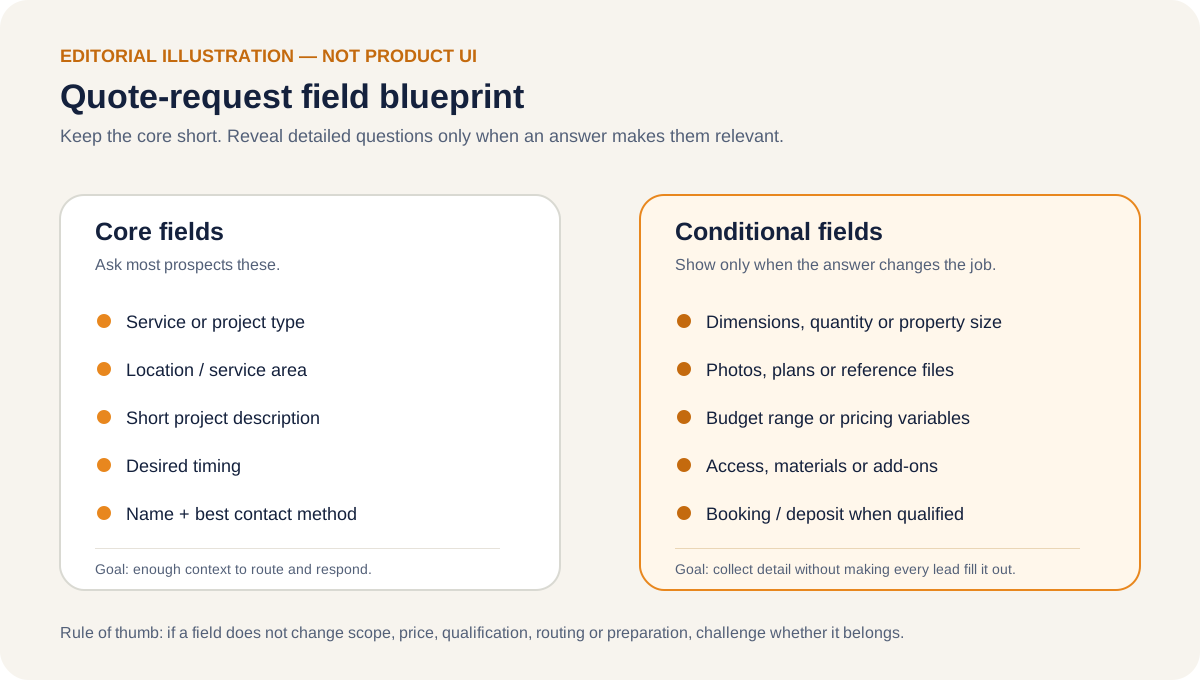
Core fields for most service businesses
- Service or project type
- Service location or postcode when geography matters
- Short description of the job/problem
- Desired timing or urgency
- Name and the best contact method
These should be enough to understand what the lead wants and whether your business can respond.
Reveal these only when relevant
- Dimensions, quantities, property size or number of units
- Photos, plans, screenshots or reference documents
- Budget range when it affects qualification or solution design
- Materials, access constraints, packages or add-ons
- Booking or deposit fields after the lead qualifies
Conditional logic is valuable because the visitor never sees questions that do not apply to their request.
Conversion design
How to build a quote request form people will actually finish
1. Ask for the decision-changing information first
Do not copy your internal sales checklist into the public form. Ask what you need to decide whether you serve the request, how complex it is, how urgent it is and what should happen next. Collect secondary details later.
2. Use conditional logic to reduce visible work
A visitor requesting logo design should not see website-development questions. A homeowner requesting lawn care should not see roof-dimension fields. Branching keeps the experience shorter without sacrificing the detail needed for specialized jobs.
3. Put uploads behind a reason
Photos can dramatically improve a remote estimate for repairs, landscaping, cleaning or design work. But do not require uploads simply because the software supports them. Explain what the image helps you assess, and review the provider's file-access/privacy model before accepting sensitive documents.
4. Do not call an estimate a guaranteed quote unless it really is
If your calculator uses fixed, deterministic inputs, an instant estimate can be useful. If the final amount can change after inspection, say so clearly. Accurate expectation-setting is better for conversion quality than a misleading number.
5. Route the lead immediately after submission
The form is only useful if someone or something owns the next action. High-fit or urgent leads might trigger an alert or booking option. Normal requests might create a CRM record and confirmation. Out-of-area requests may receive a polite alternative message. Design this routing before polishing the form.
6. Test the form on a phone
For local and service businesses, many high-intent visitors arrive from mobile search. Test taps, dropdowns, uploads, address fields, progress steps and error states on a real phone-sized viewport. A quote form that is elegant on a laptop but painful on mobile can waste your most valuable traffic.
Choose by scenario
Which tool should you choose?
Contractor with project photos
Start with Jotform or Fillout. Both fit a practical workflow with conditional questions and file uploads; Jotform has the broader form ecosystem, while Fillout's free plan is unusually capable.
Complex quantity-based estimator
Start with Cognito Forms. Its calculations and repeating-section logic are better suited to structured formula work.
Consultant qualifying leads
Start with Typeform when the conversation and qualification path matter more than displaying many fields at once.
WordPress-first business
Start with Gravity Forms if you want the quote system native to the WordPress site and are comfortable managing that stack.
Evidence
Primary sources checked
We used provider documentation for the product claims and limits in this guide. These evidence links are not affiliate links.
- Jotform: Request a Price Quotation templateConditional logic, file uploads and automatic notifications for quote requests.
- Jotform: conditional logicShow/hide fields, calculations, emails and outcome logic.
- Jotform pricingCurrent plan and account usage limits.
- Fillout pricingFree-plan responses, files, payments, workflows, calculations and other included capabilities.
- Fillout: page logicBranching pages and conditional endings.
- Cognito Forms: conditional logicField/page visibility, email routing, payment requirements and workflow conditions.
- Cognito Forms: numeric calculationsFormula support for numeric/currency calculations.
- Cognito Forms pricingCurrent entry limits and plan packaging.
- Typeform: branching logicConditional paths and different endings.
- Typeform: File Upload questionPaid-plan upload support and current 10 MB per-file limit.
- Typeform: Basic planCurrent response allowance and paid-plan capabilities.
- Paperform pricingCurrent free and paid plan packaging.
- Paperform: custom pricing rulesChanging form totals based on submitted answers.
- Paperform: pay now or pay laterPayment/quote-style workflow options.
- Tally: conditional logicProgressive disclosure, lead qualification and pricing-calculator logic.
- Tally: calculated fieldsPricing calculators, lead scoring and conditional calculated values.
- Tally plans and pricingCurrent free-use model and Pro/Business pricing.
- Gravity Forms: quote request form guideConditional logic and quote-request setup.
- Gravity Forms: calculations tutorialCalculations for quote forms and price estimators.
- Gravity Forms: licensing/free-version guidanceNo free version; core features included in paid licenses.
FAQ
Quote request form questions
What is the best form builder for contractors requesting photos?
Jotform and Fillout are strong starting points because both support conditional logic and file uploads in practical service workflows. The better choice depends on your expected response volume, integration stack and whether you need more advanced operational features.
Should a quote form show an instant price?
Only when your pricing can be calculated reliably from the submitted inputs. If the final price depends on inspection, availability or expert review, call the result an estimate or collect the request for manual quoting instead.
How many fields should a quote request form have?
There is no universal number. Keep the always-visible core small, then use conditional logic to reveal project-specific questions only when they materially affect scope, price or qualification.
Should I ask for a budget?
Ask only if budget changes what solution you can recommend, whether the lead qualifies or how the job is routed. If every customer gets the same service path regardless of budget, the field may add friction without improving the decision.
Do I need quoting software as well as a form builder?
Possibly. The form builder collects and qualifies the request. Dedicated quoting or proposal software becomes useful when you need to generate formal estimates, approvals, proposals, signatures, invoices or job records after intake.
Next step
What happens after the quote request?
If qualified leads should choose a time immediately, connect the form to the right booking workflow. Our appointment scheduling guide separates simple meeting links from paid appointments, staff/resources and field-service dispatch.