On this page
Quick answer
Is Typeform good for small-business lead generation?
Yes—when a guided experience helps you qualify the lead. Typeform makes the most sense for consultation requests, assessments, quizzes, surveys and intake forms where each answer can determine the next question or next action. It is less compelling for a basic contact form or a high-volume operational workflow where cost per response, files, approvals and document handling matter more than presentation.
The key check is your expected submission volume. Typeform states that response limits reset monthly, apply across all forms in the account, and can make forms private when the allowance is exhausted. That turns response capacity into a business-continuity question, not just a pricing detail.
Methodology
How we evaluated Typeform
- Evaluation typeEditorial research using current Typeform help documentation, plan information and workflow documentation. This page does not claim a long-term hands-on benchmark.
- Buyer lensSmall service businesses using forms to capture, qualify, book and follow up with leads—not generic survey software scoring.
- What we checkedResponse limits, free-plan availability, logic/branching, integrations, AI-assisted workflows, payment collection, lead routing and small-business fit.
- Compared withJotform as the main structured-workflow alternative, plus simpler low-overhead form options where Typeform may be excessive.
- Last checkedOctober 21, 2026. Pricing and plan packaging can change, so current provider details take precedence.
At a glance
What Typeform is—and what you are really buying
Typeform is a hosted form, survey and quiz builder best known for a conversational question flow. For lead generation, the value is not simply that it can collect a name, email and phone number. The value is that the form can become a small decision process: ask a service question, branch based on the answer, collect the right follow-up details, then move the qualified respondent toward booking or into another system.
Fit
Who should shortlist Typeform—and who should skip it
Typeform is a strong fit if you...
- Want to qualify leads before they reach sales.
- Need consultation, discovery, onboarding or intake forms to feel polished.
- Run assessments, quizzes or surveys where branching improves relevance.
- Want respondents to book a meeting after answering qualifying questions.
- Need form data to move into tools such as HubSpot, Pipedrive, Google Sheets, Slack or automation platforms.
Look elsewhere first if you...
- Only need a simple contact form with a few fields.
- Expect high submission volume and need the lowest possible cost per response.
- Rely on complex document workflows, approvals, signatures or heavy file handling.
- Need a dense multi-section form where respondents benefit from seeing many fields at once.
- Cannot risk a lead form becoming unavailable when an account-level response limit is reached.
Workflow
Typeform works best as the front door—not the whole lead system
A common mistake is evaluating a form builder only by how attractive the form looks. For a service business, the more important question is what happens after a visitor starts answering. A useful lead form should reduce friction for the visitor while also giving the business enough information to choose the right next action.
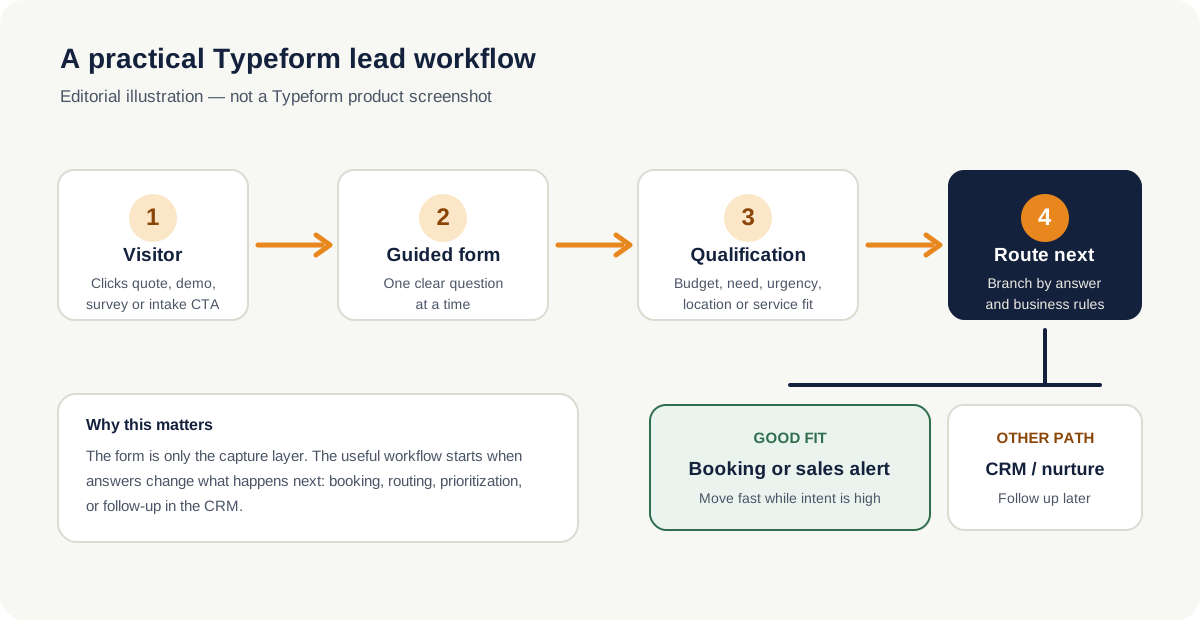
For example, a consultant could ask what service the prospect needs, budget range, preferred timeline and project type. A high-fit answer can end with a Calendly booking question or a sales handoff. A lower-priority inquiry can be routed to a different ending or follow-up sequence. The form earns its place when those answers actually change the workflow.
Buyer criteria
The Typeform features that matter for small-business leads
| Capability | Why it matters | What to verify |
|---|---|---|
| Conversational form flow | Keeps attention on one question or step at a time. | Whether your use case benefits from a guided flow rather than a compact form. |
| Branching and logic | Lets answers change later questions, endings or routing. | Current plan availability and complexity needed for your workflow. |
| Custom endings | Can send different respondents toward different next steps. | Whether you need booking, a resource, a sales page or another form after submission. |
| Calendly question | Can place scheduling directly in the form flow. | Calendar setup and whether booking should happen before or after full qualification. |
| CRM and automation integrations | Moves responses into follow-up systems instead of leaving them in a results table. | Your exact CRM fields, mappings, automation rules and plan requirements. |
| Payments | Supports use cases such as paid bookings, deposits, registrations and simple orders. | Payment provider, plan eligibility, currency and embedded-payment limitations. |
| AI-assisted creation | Can speed up building, editing, branching and test-response generation. | Availability, privacy requirements and whether AI-generated structure still matches your real sales process. |
Critical limitation
Response limits are the first thing a lead-generating business should model
Typeform's help center says response allowances reset each month and apply across all forms in the account—not separately to each form. It also says that when the limit reaches 100%, forms can go into Private mode until the next month or until the account is upgraded or additional capacity is added.
If Typeform sits on a paid-traffic landing page, quote page or consultation funnel, running out of response capacity is not merely an analytics inconvenience. It can interrupt lead capture. Estimate normal monthly submissions, campaign spikes, internal test submissions and every other active form before choosing a plan.
Typeform separately notes that AI-generated test responses do not count toward response limits, while manually submitted tests through a published form do. For teams that test live funnels frequently, that distinction is worth understanding.
AI features
Typeform AI is useful for setup—but your lead logic still needs human judgment
Typeform's current documentation describes AI tools that can create and refine forms, reorder questions and End Screens, adjust settings, build branching rules, improve writing and tone, translate forms and generate test responses. Typeform also documents AI-assisted analysis and workflow capabilities.
For a small business, the useful part is speed: you can get from a rough brief to a working draft faster. But the important decisions are still commercial. Which question actually predicts lead quality? Which answer should trigger a booking link? Which prospect belongs in immediate sales follow-up? Those rules should come from how the business sells, not from generic AI suggestions.
Verified from Typeform documentationFollow-up
Integrations decide whether responses become leads or just rows
Typeform documents integrations with business tools including Google Sheets, Slack, Google Analytics and Google Drive, plus a broader integrations area covering CRM, email marketing, sales, automation and productivity tools. Its Connect panel is designed to link an individual form to supported apps, while the account-level Integrations panel shows connected integrations across workspaces.
For lead generation, prioritize the handoff rather than the integration count. If you use HubSpot or Pipedrive, map only the fields the sales process needs. If your team lives in Slack, use a notification to surface high-intent submissions quickly. If the next step is a sales call, a booking integration can reduce the time between qualification and conversation.
Payments
Can Typeform take payments?
Yes. Typeform's help center documents a Payment question using Stripe for one-time payments, and its payment guidance also references PayPal. The Stripe documentation says respondents can pay without leaving the form and notes that the Payment question requires a Basic-or-higher account plus a Stripe account. It also documents limitations for certain data-center configurations and payment methods, so businesses should check the current guidance for their setup.
This can be useful for deposits, registrations, donations, paid consultations or simple orders. For a complex ecommerce or invoicing workflow, however, a form builder should not be forced into a job better handled by dedicated checkout or billing software.
Pricing
We would not choose a Typeform plan by sticker price alone
Typeform offers a free plan and paid plans, but the plan that fits a small business depends heavily on responses, branding, seats, analytics, integrations and other features. Its own billing FAQ says the company sometimes experiments with pricing plans, so the details you see can differ from older articles—or even from examples elsewhere in its documentation.
We intentionally do not hard-code a “starting from” dollar figure here because Typeform states that pricing experiments can create differences. Use the current Typeform pricing page and your account's plan screen as the final source before buying.
Check the plan against your real response volume
Estimate all lead, survey, quiz and intake submissions across the account—not just one form.
Trade-offs
Typeform pros and cons for small businesses
Pros
- Guided question flow can make qualification feel less intimidating.
- Branching is useful for service, budget, urgency and fit questions.
- Strong fit for quizzes, consultation forms, surveys and branded intake.
- Integrations can move qualified responses directly into follow-up systems.
- AI features can accelerate drafting, editing and testing.
- Payment and scheduling options can shorten the path from form to action.
Cons
- Account-level response limits require careful capacity planning.
- Forms may become unavailable when the response allowance is exhausted.
- Can be excessive for a basic contact form.
- Long, operational or document-heavy forms may be better served elsewhere.
- Plan packaging and pricing can change, making old comparison articles unreliable.
- The attractive front end does not replace CRM, routing and follow-up design.
Head-to-head
Typeform vs Jotform: the decision is about workflow shape
Choose Typeform first when the respondent experience is part of the conversion strategy: qualification conversations, assessments, surveys, quizzes or polished consultation intake.
Choose Jotform first when the form is closer to an operational document: detailed quote requests, files, signatures, approvals, payment-heavy workflows or complex business processes.
| Need | Better starting point | Why |
|---|---|---|
| Conversational qualification | Typeform | Guided one-question flow is central to the experience. |
| Detailed quote request | Jotform | Structured operational forms are its stronger use case. |
| Quiz / assessment funnel | Typeform | Branching and presentation suit guided outcomes. |
| Files, signatures, approvals | Jotform | More document-oriented workflow depth. |
| Simple contact form | Neither necessarily | A lighter option may be cheaper and easier to maintain. |
Alternatives
When another tool may fit better
Jotform
Best alternative when your form needs to behave more like a business workflow with documents, approvals, detailed quote inputs or heavier operations.
Read our Jotform reviewA simpler form tool
For a basic contact or newsletter form, paying for a sophisticated conversational builder may add cost without improving the workflow.
Compare form buildersCRM-native forms
If every form exists only to create or update CRM records, using the CRM's own forms can reduce integration overhead.
Explore CRM toolsDecision scenarios
Three small-business situations where the answer is clearer
Consultant qualifying discovery calls
Typeform makes sense. Ask service type, budget, timeline and challenge before presenting a booking step. The value comes from preventing poor-fit calls while letting good prospects move quickly.
Home-service company collecting detailed quote evidence
Compare Jotform first. If the form requires multiple files, detailed property information, approvals or operational processing, the workflow may matter more than conversational presentation.
Small business with a five-field contact form
Typeform may be unnecessary. If every visitor sees the same five fields and the submission simply sends an email, a lighter solution can reduce cost and maintenance.
Evidence
Primary Typeform sources checked
These are editorial evidence links. They are separate from our affiliate CTAs.
- Typeform Help Center: Response limitsMonthly reset, account-wide allowance, warnings and what happens at the limit.
- Typeform Help Center: Free planCurrent free-plan availability and supported capabilities.
- Typeform Help Center: Connect forms to other appsConnect panel, integrations panel and Calendly question workflow.
- Typeform Help Center: Typeform AIAI-assisted form creation, editing, branching, translation and test responses.
- Typeform Help Center: Stripe payment questionPayment use cases, requirements and payment-method details.
- Typeform Help Center: Billing & Payments FAQTypeform's note that pricing experiments can produce plan differences.
- Typeform pricingLive provider pricing and plan packaging; verify this before purchase.
FAQ
Typeform questions for small businesses
Is Typeform good for lead generation?
Yes, especially when the form needs to qualify prospects rather than merely collect contact information. Branching, custom endings, integrations and scheduling can turn the form into the first step of a sales workflow.
Does Typeform have a free plan?
Yes. Typeform documents a free plan. Check the current free-plan page and pricing page before relying on it for a live campaign because response and feature limits can change.
What happens if I hit my Typeform response limit?
Typeform's response-limit documentation says forms can go into Private mode when the account reaches 100% of its response allowance. That is why lead-generating businesses should model expected monthly volume before choosing a plan.
Can Typeform send leads to a CRM?
Yes. Typeform documents CRM and automation integrations, including workflows for tools such as HubSpot and Pipedrive, plus Zapier and Make. Verify the exact field mapping and plan requirements for your stack.
Can Typeform take payments?
Yes. Typeform documents Stripe and PayPal payment workflows. The exact account and payment requirements depend on the setup, so check its current payment guidance.
Is Typeform better than Jotform?
Neither is universally better. Typeform is a stronger starting point for guided, conversational qualification and branded intake; Jotform is usually stronger for structured operational forms, detailed quotes and document-heavy workflows.